Drawing markups. Direct to dashboards.
Install Insights is construction progress tracking software from Basesite: installers mark what they have installed on the drawings they already use or on a lightweight 3D viewer built from the Revit model, and the office gets quantities, percent complete and live dashboards. Built for MEP and CSA crews, with markups that capture counts, lengths, walls, areas and volumes.
Why teams use Install Insights
Easy.
Accurate.
Live 24/7.
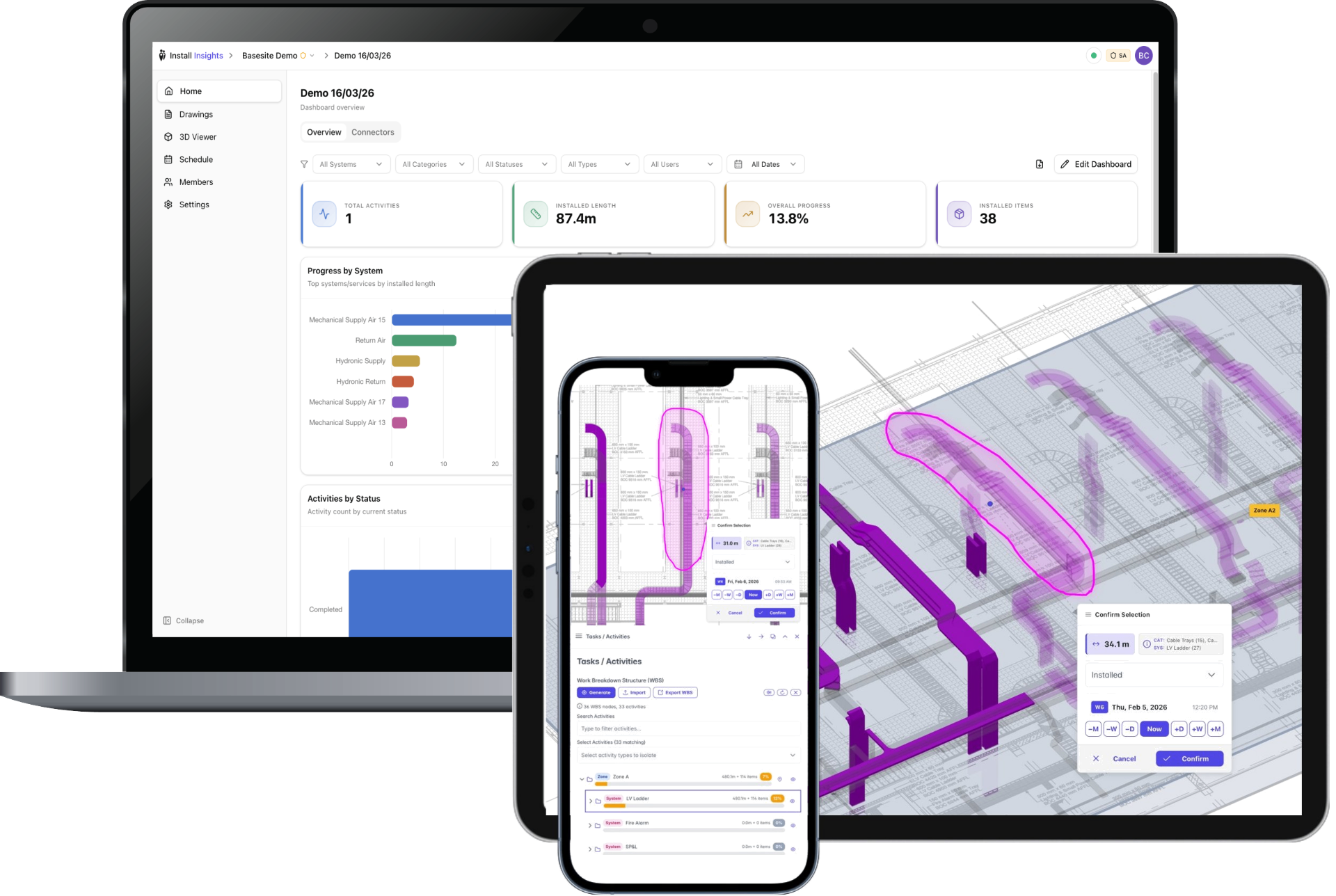
From drawings direct to dashboards
Publish
Publish drawings to mobile devices
Markup
Installers mark completed areas
Dashboard
Quantitative data captured from site in real time
See it in 60 seconds
How marks made on site become live progress in the office.
Better Decisions. Sooner.
A clear record of what is installed supports commissioning and turnover with confidence.
Who it's for
Installers on MEP (mechanical, electrical, plumbing) and CSA (civil, structural, architectural) crews mark the work they've done. Everyone who needs progress sees it. Pick your role.
Know what's really installed.
Stop chasing crews for updates and rebuilding spreadsheets for the end-of-week report. Installers mark their work as they go. Install Insights turns those marks into progress data.
- Percent complete by system
Worked out from what installers have marked, not from estimates.
- Installed quantities
Counts, lengths, walls, areas and volumes, from the marks on site. No manual take-offs.
- Live dashboards
Fed straight from installer markups, ready for the office.
Get on with the work.
Mark what you've installed and move on, from a phone or a tablet. Your markups become the progress the office sees.
- Mark up the drawings you know
Mark installed work on the same drawings you already use.
- Or tap it in 3D
Tap installed elements on a lightweight 3D viewer of the project.
- No BIM skills, no new training
Nothing new to learn and no BIM software to open.
Set the project up from the Revit model.
The project starts from the model you already look after. Export it with the Install Insights Revit exporter. The viewer and the quantities are built from that model's geometry.
- Export from Revit
Use the Install Insights Revit exporter add-in, inside Revit.
- A lightweight 3D viewer
Built from the model's geometry, so crews mark the elements you modelled.
- Quantities from the model
Installed quantities come from the same geometry, not a manual take-off.
Get MEP and CSA progress you can trust.
See where the MEP and CSA trades are as the work is marked on site. Not when the end-of-week report lands.
- Progress by system and area
Current figures, taken from installed work marked by the crews.
- Shareable read-only dashboards
Share a view of progress that others can read but not change.
- No waiting for the weekly report
Progress is current whenever you look.
Seamless Integration with Your Existing Tools
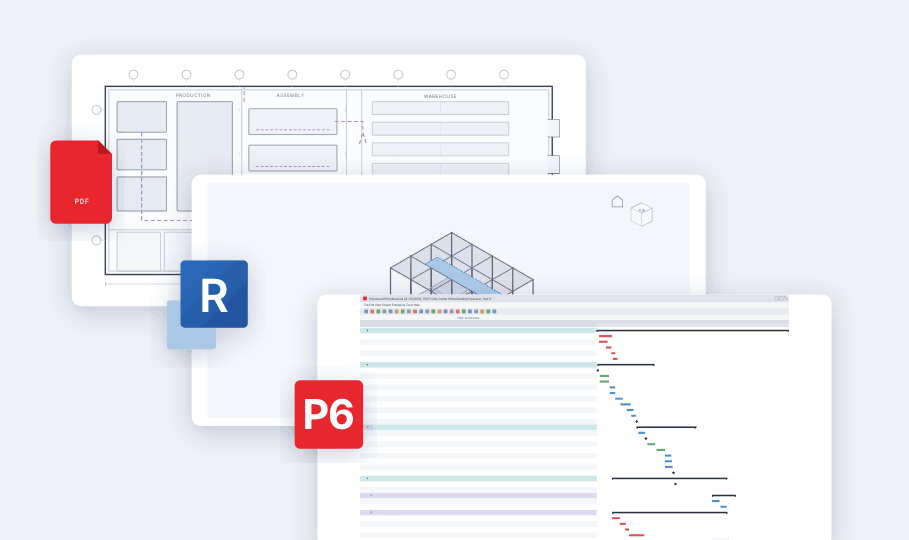
Install Insights works alongside your current workflows. Import drawings from PDF, sync model data from Revit, and align progress with your P6 schedule.
- ✓PDF Drawings
Import site drawings directly from PDF exports
- ✓Revit Model Data
Enrich drawings with quantitative data from BIM models
- ✓P6 Schedule Alignment
Map progress to activities in your Primavera P6 schedule
Smart Markup Interface
Circle items to mark them complete. Real-time visual feedback shows progress instantly, metre by metre, with breakdowns by size, system, material and more.
Opens the live demo from demo.installinsights.com.
Try interacting with the viewer above — circle elements to set their install status in real time.
Try Full DemoFrequently asked questions
Short answers on setup, devices, schedules, the free trial and how data is protected.
Install Insights is construction progress tracking software from Basesite: installers mark what they have installed on the drawings they already use or on a lightweight 3D viewer built from the Revit model, and the office gets quantities, percent complete and live dashboards.
MEP (mechanical, electrical, plumbing) and CSA (civil, structural, architectural) crews: project and site managers, installers and field crews, and BIM coordinators. It is also for the main contractors and owners who receive progress from those trades.
No. Installers mark their work on the drawings or on the 3D viewer in a web browser, with no BIM software to open. There are no BIM licences to buy for site.
Your PDF drawing sheets, the Revit model exported with the Install Insights Revit exporter add-in, and the project schedule. The add-in works with Revit 2024, 2025 and 2026.
No. There is no hardware to deploy and no calibration: installers mark their work on a tablet or phone, with no new infrastructure on site.
It runs in a web browser on desktop, tablet and phone. Installers can record progress with no signal, and it syncs when the device is back online.
Primavera P6, plus Asta Powerproject, Microsoft Project and others through MPX conversion. Progress is mapped to the activities in the schedule.
Counts, lengths, walls, areas and volumes. They become installed quantities and percent complete by system, with no manual take-offs.
Yes. Earned value comes from the work installers confirm on site, with the budget set from unit rates, actual cost from the hours they record, and CPI and SPI shown over time. Our blog post on earned value explains how it works.
Yes. The free trial lasts 30 days and covers one project and one user; sign up with a company email, no card needed. Pricing depends on the size of the project, so contact us for details.
Basesite Ltd, headquartered in Maynooth, Co. Kildare, Ireland, makes Install Insights and operates in compliance with the GDPR. Basesite is ISO/IEC 27001 certified.
Ready to Eliminate Manual Take-Offs?
Simple markups. Fast progress capture. Real-time visibility—without the complexity of BIM tools.